

Meet Apex Flash-1, our first open-weights model built for security research. This release also makes it easier to create agents, prioritize findings and keep investigations moving.
Introducing Apex Flash-1
Built in partnership with Yeta Labs, Apex Flash-1 brings training from real vulnerability cases into a model security teams can download and run in their own environments.
It is designed to take on focused investigation tasks under a larger agent’s direction: reading code, using tools, testing an exploit and verifying its effect against a running target.
In our internal evaluation of 60 tasks from 20 held-out vulnerability cases, Flash-1 solved 40 tasks, compared with 36 for its base model and 43 for Claude Opus 5 High. The estimated cost for the full run was $2.38, compared with $4.56 and $74.68 respectively. These are results from this evaluation, with estimated costs, not a guarantee of performance or pricing on other workloads.
Read the launch announcement and download Apex Flash-1.
Let Clarion help you create your next agent
Creating a security agent can be tricky, from writing its skills to setting up recurring tasks, but now you can just ask Clarion to help. Describe the work you need done, and Clarion can create the agent and write its skills. Admins can also ask it to schedule recurring tasks. Just click on Ask Clarion and start creating new agents.
Get started with Apex in your coding agent
Connect your coding agent to Apex and find prompts for reviewing findings, scanning a repository, and checking credits, all in one panel.
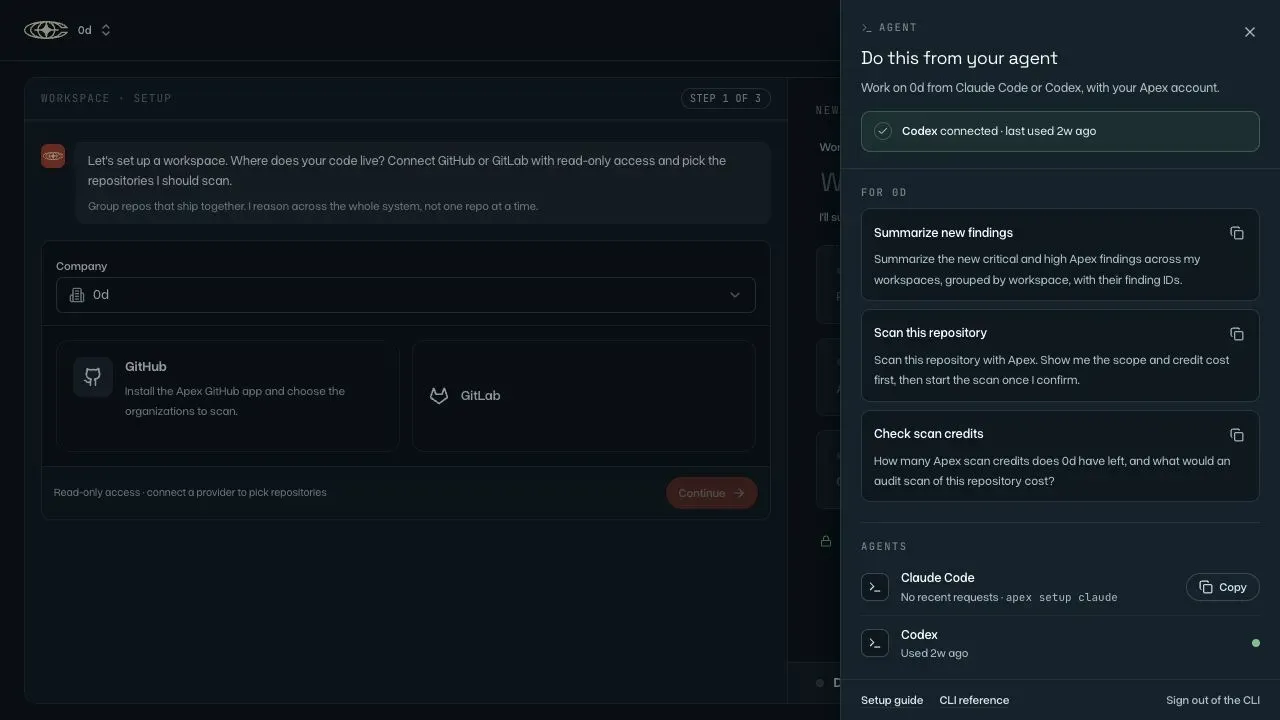
Apex’s coding-agent panel shows connection status and prompts for reviewing findings, scanning a repository and checking credits. Screenshot from the live product.
Decide what needs fixing first
Review findings against your team’s scoring policy. Apex now includes a workspace CVSS 3.1 policy and feedback editor, with assessment metadata on scored findings. Severity filters and totals use those scores, helping you focus your review.
Once you’ve narrowed the list, filtered Apex findings can be downloaded as Markdown again following a fix to the export menu.
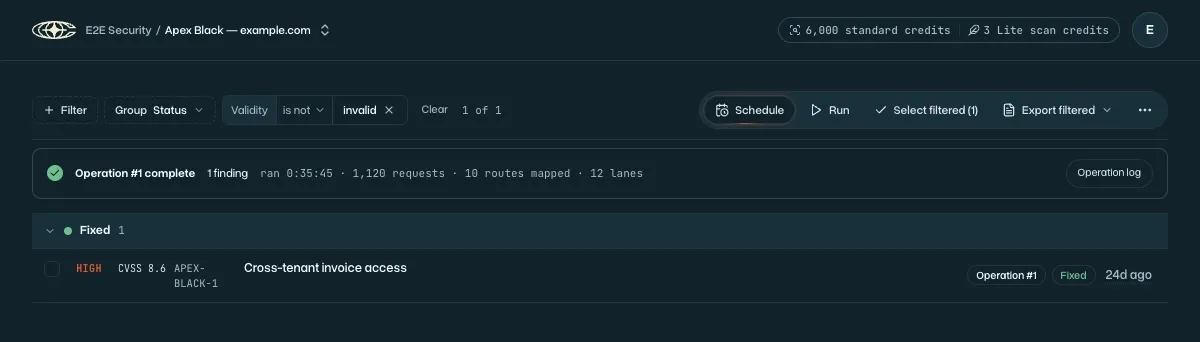
A CVSS score appears alongside finding severity in the review list. Product screenshot using synthetic demo data; this view illustrates finding scores, not the new workspace policy editor.
See which findings share a fix
Amazon Inspector can flag several findings that all need the same fix. Clarion now groups them together, so there’s less noise to sort through and it’s easier to track what needs patching.
Investigate from the asset, with its context
Start an investigation directly from a system or asset in Clarion’s Brain. Assets linked to an issue also link back to the Brain, so you can move between an investigation and the people, systems and knowledge around it.
The redesigned graph connects knowledge documents, references, systems and resources. Documents support in-document review and links to other workspace topics and resources, with previews and broken-link indicators.
New connections add more context to work with:
- Swif: Bring managed devices, compliance posture and employee information into the Brain.
- Pylon: Let agents search and read connected knowledge-base articles during investigations.
- Supabase: Monitor authentication activity to help investigate access to your projects.
- Devin: Give Clarion access to your organization’s Devin skills and sessions, and start Devin sessions for investigations.
GitHub organization members and Vercel team members now appear as identity assets, extending the people context available during investigations.
Keep the conversation moving in Slack
With thread following enabled, you no longer need to @ mention Clarion in an existing thread. Clarion will automatically follow the conversation and jump in when needed.
We’ve also made it faster, so less time waiting between replies.
Also shipped
- Detection setup: Add signal-rule templates in one click. Scheduled discovery can suggest new rules.
- Custom connections: Connect MCP servers that use a custom authentication header, and edit Custom API tool parameters, including nested fields and allowed values.
- Credit auto top-up: Configure automatic credit purchases in Apex, with renewed consent required when top-up prices change.
- PR and fix reviews: Apex scans use isolated, commit-pinned context.
- Issue filtering: Exclude values with “is not” and surface matching issues inside folded groups.