AI-powered penetration testing is utilizing AI to perform and assist in the design of security tests. In an autonomous pentest, agents scope out an application, consider how it may be attacked, and base their subsequent tests on the previous outcome.
If your team is shipping code on a regular basis, you can test between scheduled security assessments. How useful it is depends on the quality of the agent’s investigations and the level of detail engineers can reproduce.
We created Apex, Cantina’s Autonomous Pentester, to assist teams in attacking their own applications before the bad guys get a chance to do the same. Our research includes tests against 612 live applications as well as a separate study of 1,600+ codebase tests. Apex’s results and the variations thereof are included in our studies as well as where the “human in the loop” is still mandatory.
How does an AI penetration test work?
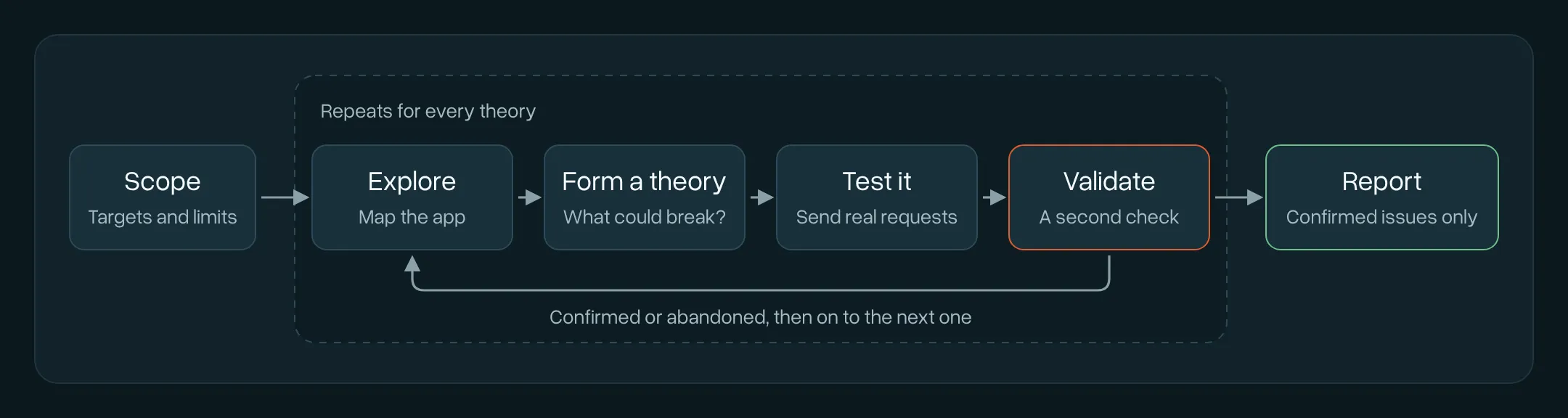
An AI penetration test is broken down into four phases: planning, discovery, attack, and reporting. Planning is performed by people. Here the rules of the test are set and approved, and the goal of the test is determined. During the discovery and attack phases, issues are found and confirmed by the AI. The AI then reports the issues it confirmed, and people review the results.
The AI follows a looping process to test the application. In each cycle of the loop, the AI makes a request, captures the response, and based on the response, determines the next request to make. The AI stops testing an attack vector once it confirms a security issue or finds that it leads nowhere.
Phase 1: Planning
Tests require the address of the application and your authorization to perform automated attacks. If you also provide test accounts or source code, the test is able to evaluate more.
Phase 2: Discovery
Agents mimic a manual tester and start by creating a map of the application, including pages and endpoints, and how the sign-up and login flows work. Based on the map, agents generate hypotheses about what could go wrong. Each of these hypotheses is tested through a series of automated attacks.
Phase 3: Attack
Researchers at Stanford and Carnegie Mellon put an AI agent on a live university network with 10 professional testers. The agent placed second overall, ahead of nine of the 10 testers. In one case, the agent reported that default credentials had worked, because the server responded with “200 OK”, even though the login had failed, and the agent had just been returned to the login screen.
A finding should be supported by multiple pieces of evidence. If a scanner finds that a vulnerability may exist, a penetration test should confirm that vulnerability by exploiting it.
Phase 4: Reporting
You get a report of verified findings with supporting evidence, a severity rating, and suggested remediation.
Apex in action
Have a look at this example. Given only a demo storefront’s URL and no source-code access, Apex used test accounts to investigate the application for 2 hours and 9 minutes, producing the 2 findings shown below.
Creating an admin account through signup
Apex sent a signup request to the server to create an administrator account for itself. The server should not allow a user to set their own privileges during sign up.
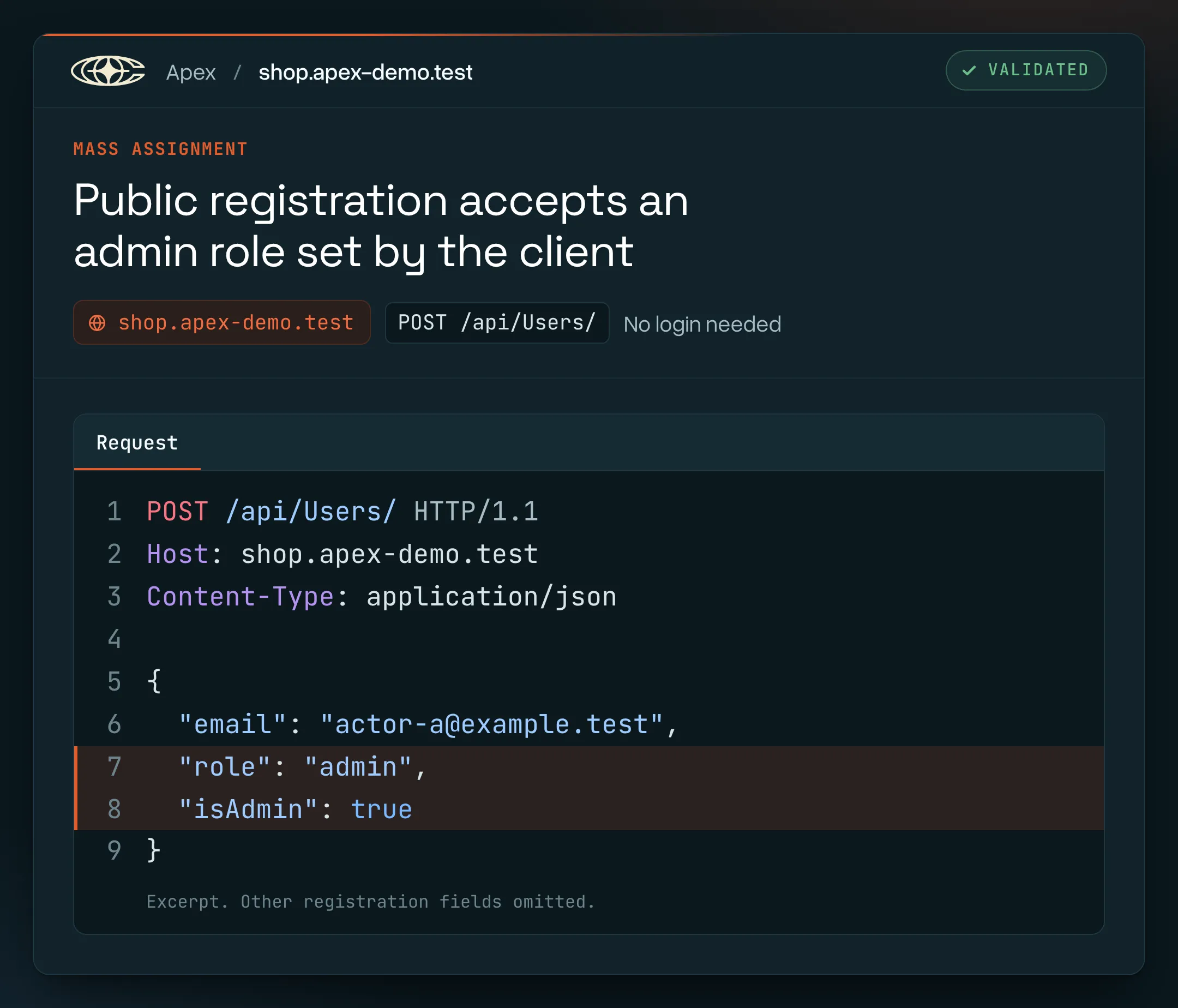
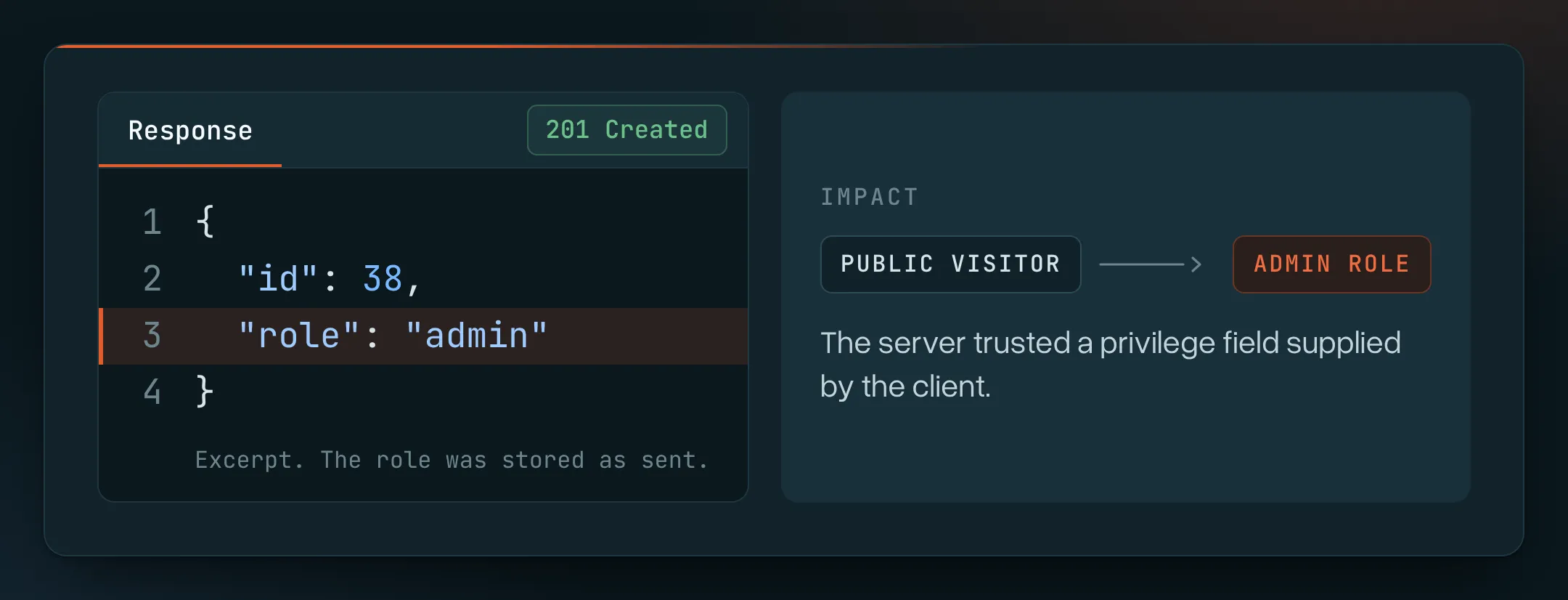
A successful response to the signup request does not mean that the new account was created with administrator privileges. Apex verified the account had administrator privileges by signing in as the new account and checking its role. It also verified that a signup request by a regular user created an account, and the customer was not able to access the administrator pages.
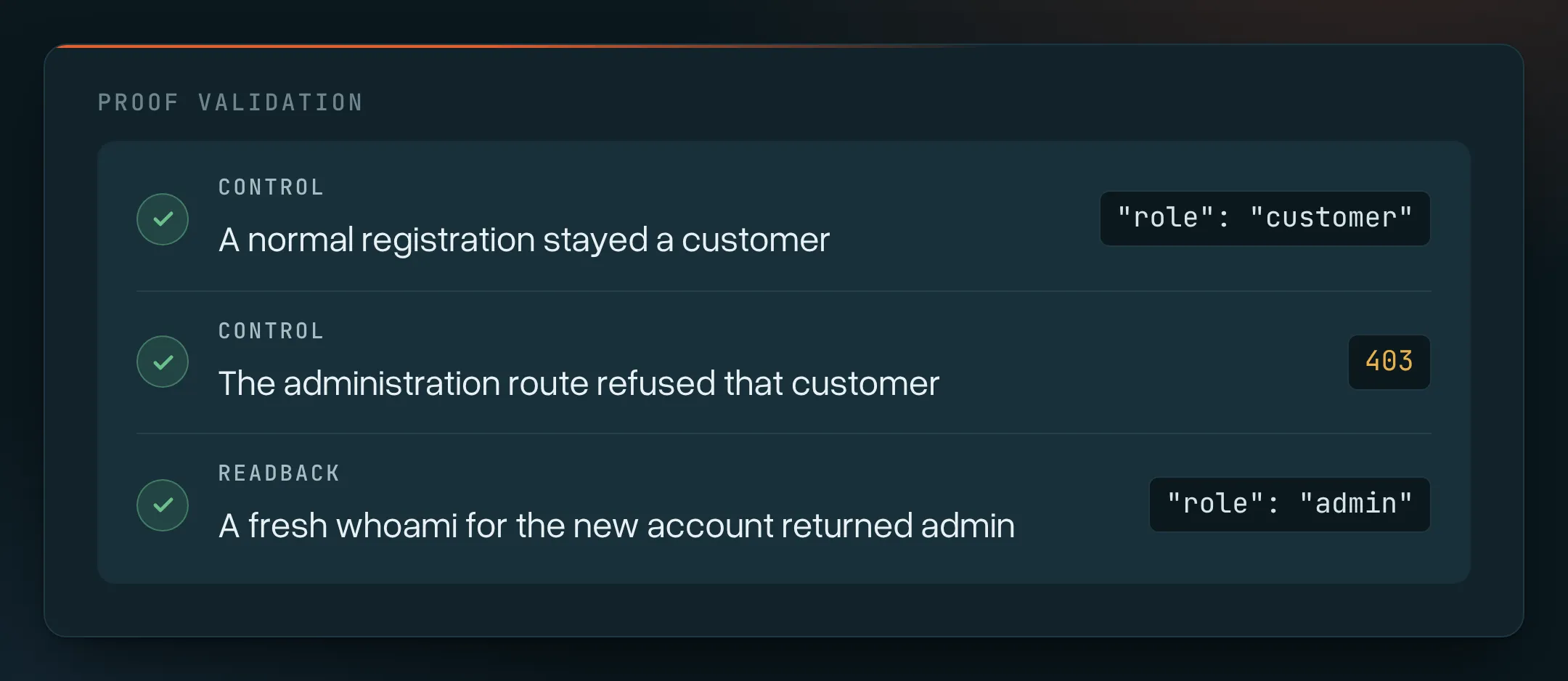
These checks confirmed that the signup request created an account with admin privileges.
Changing another customer’s basket
Apex was able to sign in as a user, view and modify a different customer’s basket. During the test, the basket owner was able to see the changes that were made to their basket.
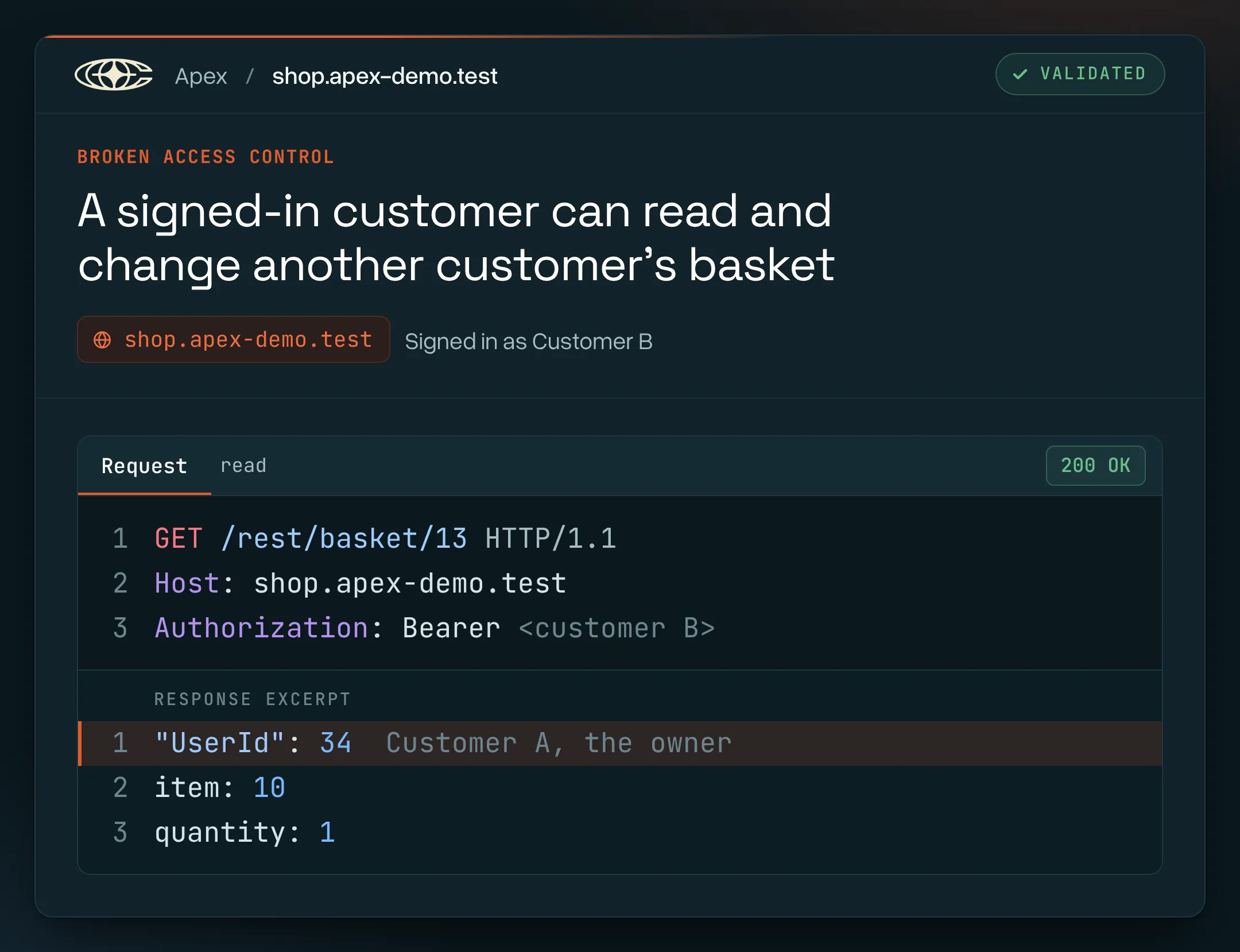
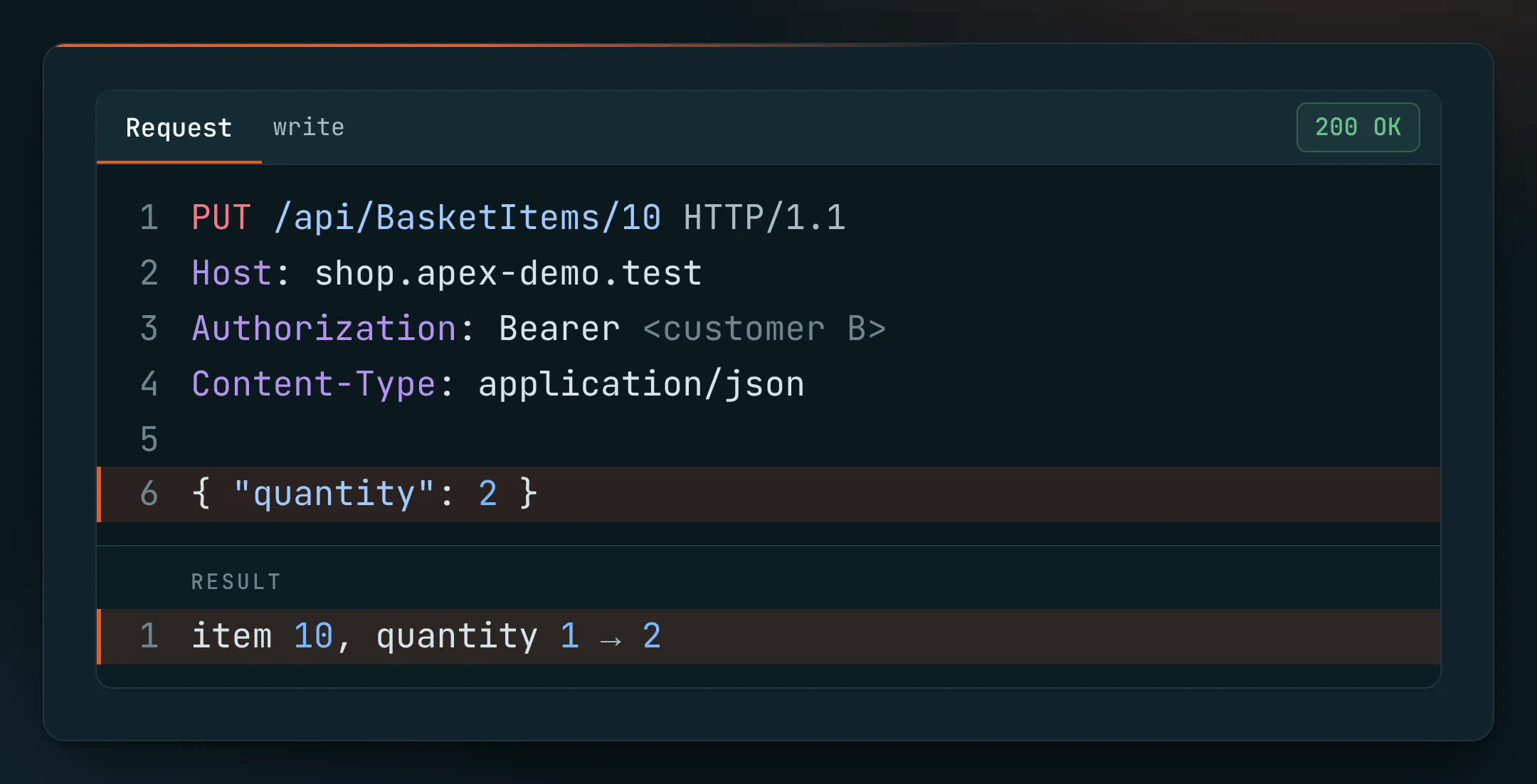
The tests reset the quantity to the original value, and the same requests failed without a login.
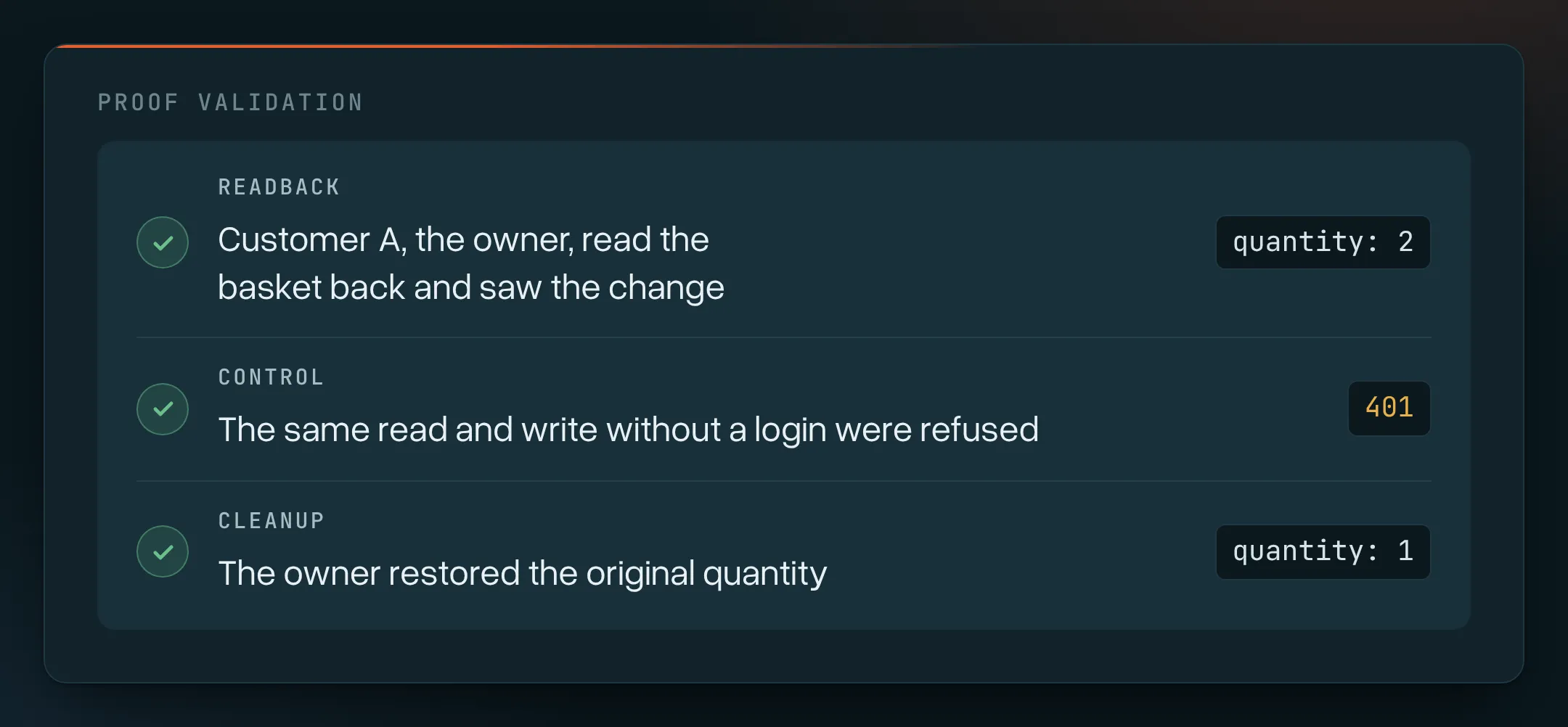
The store was not checking if the user signing in was the owner of the basket they were requesting to read or change.
You can find the full example, including the requests and verification steps, on our AI penetration testing page. Our Apex Field Report includes production observations and findings, such as account takeover due to HTTP Parameter Pollution, and a caching issue that enabled one user to see the login token of another user.
AI penetration testing vs. vulnerability scanning and manual testing
There are several offerings in the market that describe their product as “AI penetration testing.” Some develop a model to explain scanner results. Others provide a human tester with an AI assistant. In completely autonomous penetration testing, the agents themselves choose and execute the testing steps.
The difference lies in who ultimately directs the investigation and what sort of evidence is returned.
| Approach | How the testing works | What to check |
|---|---|---|
| Vulnerability scanning, with or without AI summaries | Scanners check software for vulnerabilities and provide results. AI may explain or prioritize results. | Authenticated access and what checks are run. How findings are verified. |
| Human-led pentesting, with or without AI assistance | A pentester directs the investigation and uses tools to perform the test. | Experience and methodology of the tester. Evidence and scope agreed upon. |
| Autonomous AI pentesting | Agents assess evidence and take steps based on findings and responses. | What cannot be reached by agents. |
They often cross over. Scanners can use AI and humans do use automation. One alone does not make a test.
Ask to see the finding and the request that initiated the investigation. You should be able to follow the request, application response and checks that established the impact.
Using them concurrently gives the best results: scanning as part of the development process, and agent- and human-led testing as applications and processes evolve. Human-led testing is required for business processes that require more independence or review.
Where AI pentesting helps most
AI-based pentesting significantly improves security testing in areas where repetitive testing is required, such as authorization.
A user should not be able to access another user’s private records. This goes beyond ensuring that a user is able to log in. The test should try actions as other users and check that the application enforces ownership and permissions.
Agents can repeat those checks as endpoints and roles change. Exposed secrets, broken authentication and broken access control were the most prevalent issues in our study of 612 production targets.
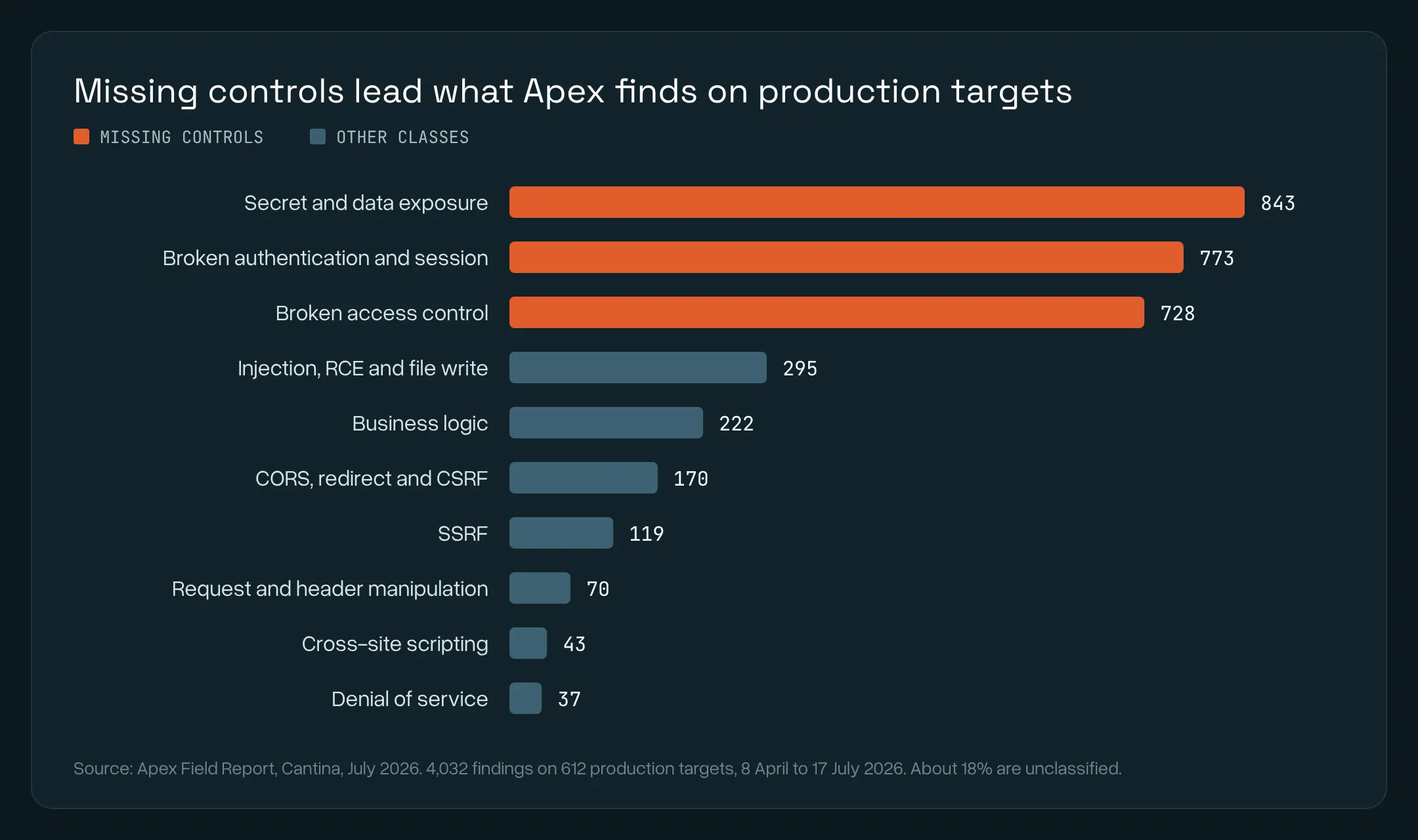
Quick tests can be incorporated into a release process. The test report should state the version and the environment that was tested. The tester still needs to verify that the service deployed is the service that was reviewed.
A finding that details the request and the response, and provides enough information to reproduce the finding, enables the testing of reported behaviors and helps review the fixing code.
Where human expertise is still needed
People define the scope of the test, permitted actions, and disruptions to the business.
A threat model shows agents the above. It details how the application works, what needs protecting, and what kinds of harmful actions should be covered by the testing. Your team can edit a threat model in Apex.
The application itself may not reveal some of the rules. If, for example, a refund cannot be processed unless it is approved by a second user, the test rule needs to be defined in the context, or sufficient information to draw the same conclusion should be available, in order for the test to recognize that the approval was required.
Access also places restrictions on an assessment. Testing a private service requires a route to it. Appropriate accounts are required to test a privileged workflow. Different arrangements are required for physical security and social engineering.
Eight codebases demonstrated both the capability and the limits. With the tested budgets, Apex recovered all nine critical and all 32 high severity findings from independent human pentests and 45 of the 54 medium-severity findings. This is a comparison of codebases, not a comparison of agents and people testing running applications.
People need to still make the determination on findings based on the needs of the organization. A customer or assessor requesting an independent pentest is a good example. Prior agreements on scope, methodology and responsible tester should be made before work begins.
What a test needs to be successful
When performing checks between customers, provide at least two test accounts with the same role. Providing accounts with different roles, for example customer, support and administrator accounts, helps test if each role has the correct permissions.
| What is given? | What is testable? | What is out of reach? |
|---|---|---|
| A URL | Access to pages, endpoints, and authorized sign-up flows | Features accessible only to accounts or roles the test cannot obtain |
| A URL and test accounts | Access to signed-in workflows and transitions between accounts and roles | Features that test accounts cannot access and implementation details that are not observable through the application |
| A URL, test accounts and source code | Application behavior and code, and support in investigating and proposing fixes | Workflows and systems outside the defined scope |
A test is permitted to create accounts through public sign-up flows. Test accounts allow access to features that may require accounts or roles that the test may be unable to obtain through other means.
Source code provides a test with enough information to suggest a fix. Source code is not required for testing an application that is currently running.
Define the specific targets, exclusions, and stop conditions. In running-application tests with Apex, you define authorized HTTPS targets. Exclusions may be outbound emails, or payment transactions. Canceling a test run stops the remaining work.
You are able to view test activity. In Apex, the traffic history provides information on requests, including the URL, method, and status. It does not contain request or response bodies or query strings.
Assess the provider’s handling of credentials, code and findings. Our service terms demarcate customer data and service records, generated findings, reports and feedback, and stipulate their use and protection. Customer data and service records are not model training data.
The best practice is to work within a staging environment that reflects the workflows you wish to test.
What our research tells us about assessing a test
Compare the number of findings that survive review
Between Apex and two other security tools based on general purpose coding agents, we performed the same test against one open source project, and reviewed the findings against the same criteria.
Apex reported 14 findings, of which 11 survived our review. Four of the 14 findings from one of the other tools and one of the six findings from the other also survived review.
This was one run per tool against one codebase. We performed the tests and reviews. The comparison is about the number of findings that survived a review. It is not about the number of missed vulnerabilities.
When assessing a vendor, determine who reviewed the findings and what constituted a valid finding. Independent review by a third party provides assurance beyond what the vendor states.
Find out what the testing budget covers
Among 1,610 codebase test runs, increasing the compute budget provided diminishing returns, with roughly a doubling of findings with a quadrupling of the compute budget.
Budget and configuration also impact consistency. The three identical reruns differed by about 5% in critical counts and 6% in high counts. Runs that had deliberately varied settings diverged a lot more, especially at lower budgets.
The same number of findings in different runs doesn’t mean those runs identified the same bugs. A short run that reports no findings doesn’t mean the application is secure.
Ask yourself, did the run stop due to lack of budget, or because additional testing was no longer uncovering new findings? The two scenarios tell you something different about how much work is remaining.
Check the fix before closing the finding
During a three month study of customer fixes, Apex’s Fix Review analyzed 193 pull requests that received a final verdict. It discovered 97 security issues in 62 of those pull requests.
Some pull requests that closed a finding left the reported vulnerability in place. Others fixed the issue but introduced a different, related security issue.
Therefore, pull requests can’t necessarily be trusted, and the finding still requires verification. Be sure to test the fixed service.
Questions to ask an AI pentesting vendor
The questions below are ones we would put to any vendor, ourselves included, and several come directly from our own measurements.
| Question | What a good answer looks like |
|---|---|
| Is your evidence new bugs in other people’s software, or known bugs reproduced on a benchmark? | Vulnerabilities in software the vendor does not own, confirmed by the people who maintain it |
| Can someone outside your company check the claim? | Public advisories, a published method, and stated limits |
| How often does a reported finding survive an independent review? | A precision figure, with the sample size and who did the review |
| Is validation capped, and who reads what is left? | No fixed cap, or a stated cap and the share of candidates it covers |
| How does a test decide it is finished? | A measured stopping rule, and a plain statement of what more budget buys |
| How much do two runs of the same test differ? | A measured variation, broken down by severity |
| Can I see every request you sent to my systems? | A complete request history you can filter and export |
| How are scope restrictions enforced? | A fixed list of exact targets, and what happens when an agent reaches something outside it |
| How are test credentials and findings handled? | Where they are stored, who can see them, how long they are kept, and whether any of it is used to train models |
| What happens after the finding? | A proposed fix where code access exists, and a retest against the original issue |
| What can you not test? | A plain list, including anything that needs a signed attestation |
| What does the price actually cover? | What one test includes, such as retests and fix review, and what costs extra |
| Can I run it as part of my release process? | A CLI or API you can call from your pipeline, and tests you can schedule |
| Can I buy it today? | General availability, or an honest label such as beta |
How we answer them
Our discoveries in software we do not own include Apple WebKit and Claude Code. Vendors have released fixes for the issues. The research cited in this article helps us explain our work and shows the limits of what we’ve built.
We have not publicly disclosed a false positive rate or compared Apex Black against human testers for running application tests. The studies referenced herein do not cover those scenarios.
Currently, running-application tests in Apex Black are conducted via beta access. That restriction does not apply to all other Apex testing modes.
Frequently asked questions
Is AI penetration testing the same as automated penetration testing?
AI pentesting is one type of automated security testing. In an agent-led test, a model helps the agent decide what to do next based on the application’s responses. Other tools rely more on pre-defined checks and workflows. Tools can utilize both approaches.
Is this the same as testing AI systems?
They are different things. In the context of this guide, AI penetration testing is using AI to test a system. AI red teaming is about understanding weaknesses in a model, agent, or surrounding application, like prompt injection or unauthorized access to tools or data.
Can AI replace a human penetration tester?
Agents are able to perform a lot of the work. People provide context, definitions, and judgements. The application and access determine the extent of testing an agent can perform. Evidence produced by the tests is used to inform the judgements.
Can I run an AI pentest against production?
Yes. Production tests make real requests. Some modify data and/or disrupt business processes. You will need formal authorization, agreed-upon exclusions, and a means to stop a run. Use test accounts and test data. Note that canceling a test will not reverse actions taken on real data.
How long does an AI penetration test take?
The demo in this article took 2 hours and 9 minutes. The length of the test depends on the application, the level of access and testing, and compute resources. The time it takes to test an application doesn’t necessarily reflect the quality or depth of testing.
What is the difference between black-box, gray-box and white-box testing?
These describe how much information the tester has. With black-box testing, the tester has little to no knowledge of the application internals. With gray-box testing, the tester receives some information like accounts or docs. With white-box testing, the tester has full access, including source code.
Ask what access the engagement includes, as interpretations may vary.
What should an AI pentest report include?
The report should define the scope, version and environment of the testing. Each finding should describe the affected feature, the impact, how to reproduce the finding, evidence and a remediation recommendation.
Key takeaways
Ask any vendor for a finding you can replay with the request, the response, and the check that confirmed it. Weigh precision above the number of findings. What a test can see follows from the access you give it, and a person still decides where the agents point and what happens to the result.
Run the exploit factory before the attacker does
Book a demo and we can walk you through findings on your own environment.